
Invoices
An invoice combines all active subscriptions on the account: the pricing plan, additional registers, locations, and other connected Poster products or apps, if they fall within the current billing period.
Subscriptions connected after an invoice has been generated will be included in the next invoice.
Where to view Poster subscription invoices
All invoices available for payment, as well as already paid ones, are displayed in the management console, under Settings → Billing, in the Overview section.
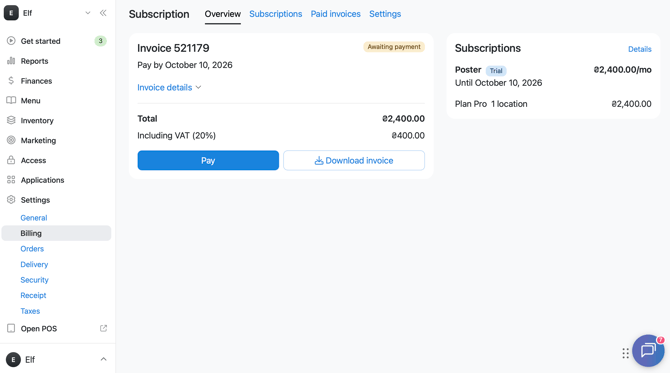
💡 To have your company's billing details — Tax ID, registered address, and other information — appear on the invoice, add them in the Settings section, under Settings → Billing.
When a Poster subscription invoice is generated
An invoice is generated automatically:
- 7 days before the payment date — for monthly or quarterly subscriptions;
- 30 days before the payment date — for annual subscriptions.
What subscription periods are available for Poster
You can pay for your Poster subscription for one of three periods: 1 month, 1 quarter, or 1 year.
☝️ The minimum payment period is 1 month.
Poster subscription bills are always issued for one of these three periods. You can't pay for a subscription for any other period.
Payment deadlines and the credit week
A subscription invoice must be paid within 14 days of being issued: 7 days before the current subscription expires, and 7 days after it expires — the credit week.
The credit week is a 7-day period after the subscription expires, during which the POS register and management console remain available.
The credit week applies to the Poster subscription only — it doesn't cover apps. For example, Poster QR won't work if it isn't paid for on time.
If you miss a subscription payment, your location won't stop working immediately. During the credit week, you can still take orders and print kitchen tickets and guest receipts in the POS register. Once the credit week ends, access to the register will be blocked.
Who has access to the credit week
The credit week is only available if you've paid for a Poster subscription before. If this is your first payment, the credit week won't apply.
Paid Poster Invoices
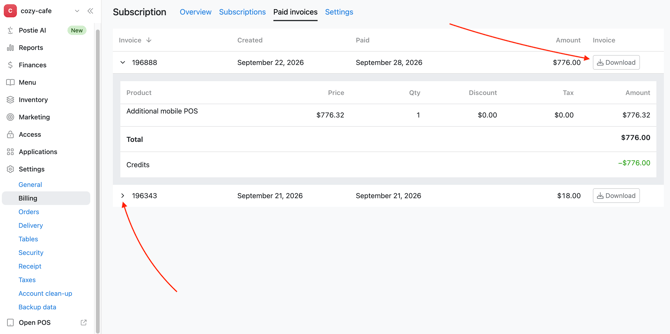
The payment history is available in the Settings → Billing tab, in the Paid Invoices section of the management console. Each invoice displays its number, creation date, payment date, and amount.
To view the payment details, click > next to the invoice number.
To save the payment document, click ↓Download next to the relevant invoice and wait for the PDF file to download.
When a subscription is renewed after payment
If you pay for your subscription by bank card in the management console, it will be renewed automatically within a few minutes after the payment is successfully processed.
Pay your subscription on time to avoid any interruption to your Poster services. If you need help with an invoice or payment, contact us via chat.