
Використовуйте ручне списання, якщо товар зіпсувався, закінчився його термін придатності, його використали для тестування страви чи харчування працівників.
Як додати списання в адмін-панелі
- Відкрийте вкладку Склад → Списання в адмін-панелі.
- Натисніть Додати.
- Вкажіть дату та час списання.
💡 Мова календаря залежить від мови, встановленої на пристрої, з якого ви відкриваєте адмін-панель. Наприклад, якщо на ноутбуці встановлена англійська мова, календар у списанні також буде англійською. - Виберіть склад, з якого потрібно списати продукти.
- У полі Причина виберіть потрібну причину зі списку. Якщо потрібної причини немає, натисніть Додати та створіть її прямо в картці списання.
- За потреби додайте коментар, щоб деталізувати причину списання.
Наприклад, причина — «Розробка рецептури», а коментар — «Підготовка літнього меню». - Додайте в спсиання товари, інгредієнти, тех. картки, напівфабрикати або модифікатори тех. карт та вкажіть їхню кількість.
- Натисніть Зберегти.
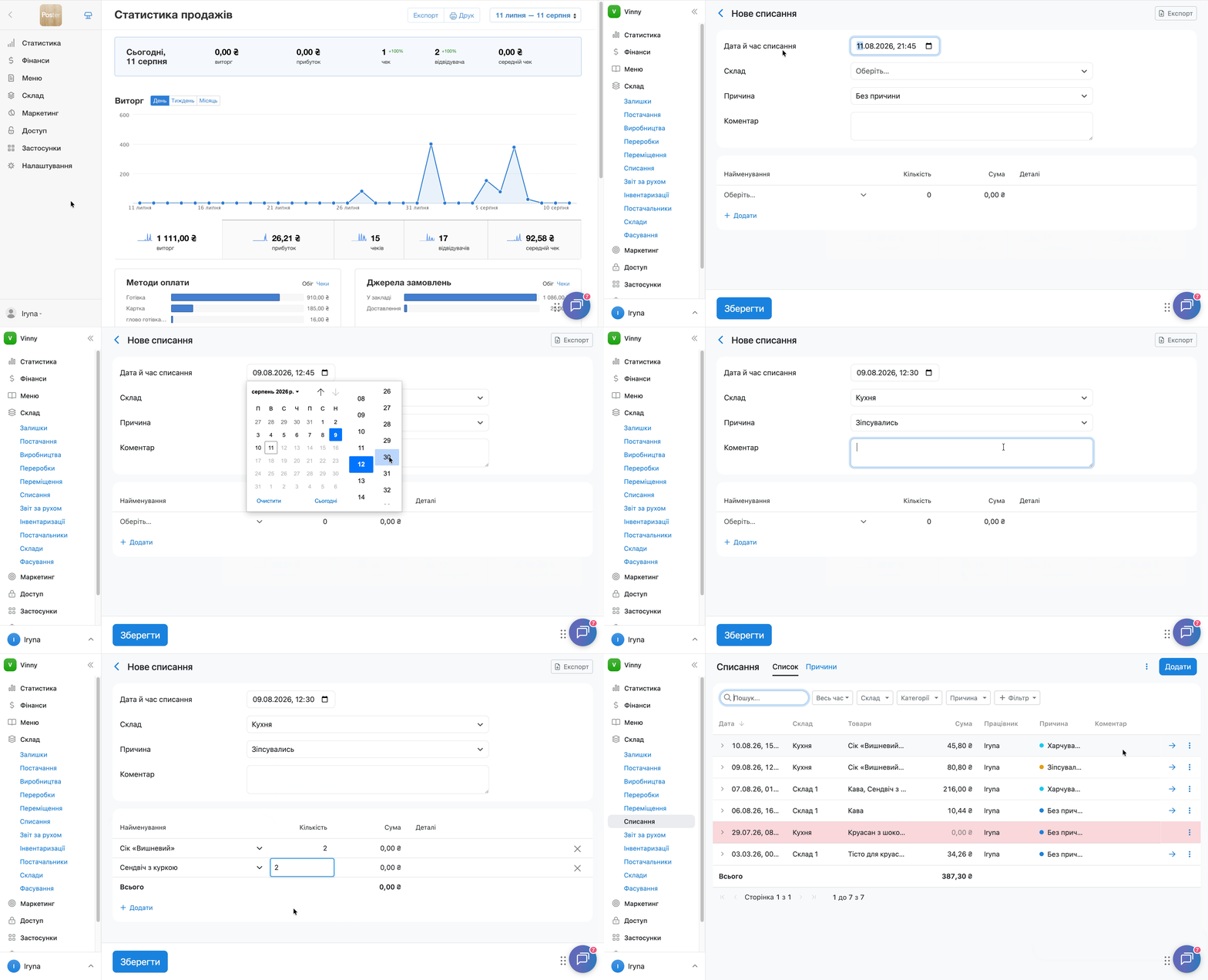
Списання з'явиться у загальному списку списань з розрахованою сумою та обраною причиною.
💡 Якщо у вашому акаунті не налаштовано жодного фасування, блок Фасування у формі списання автоматично приховується.
Якщо фасування налаштовані, одиниця виміру списаної позиції відображається у блоці Фасування під час створення списання. Окремого стовпця Одиниця виміру у формі списання немає.
Як списати частину тех. картки
У списанні не вийде вказати, наприклад, 0,5 тех. картки напряму. Щоб списати половину тех. картки, створіть фасування:
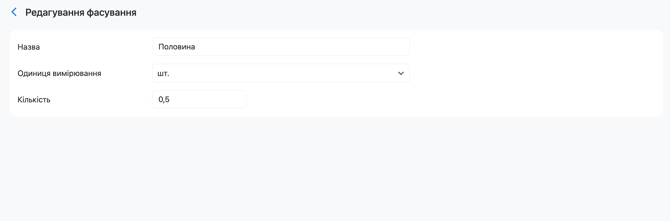
- Відкрийте вкладку Склад → Фасування та створіть фасування з кількістю 0,5 для одиниці виміру шт. Назвіть його, наприклад, «Половина».
- Під час створення списання виберіть це фасування у блоці Фасування.
- У полі Кількість вкажіть 1.
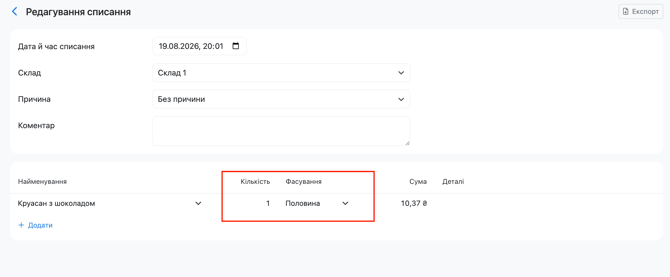
У результаті Poster спише інгредієнти на половину порції тех. картки.
Навігація у формі списання за допомогою клавіатури
Під час заповнення списання використовуйте клавіатуру:
- Tab — перейти до наступної комірки;
- Shift + Tab — повернутися до попередньої комірки;
- Enter — активувати комірку для введення або редагування даних.
Як розраховується сума списання
Сума списання — це добуток кількості списаного продукту та його поточної собівартості. Наприклад, якщо списати 2 кг продукту із собівартістю 100 грн за 1 кг, сума списання становитиме 200 грн.
Poster розраховує собівартість за середньозваженим методом.
Чи вийде зробити списання минулою датою
Так, щоб зробити списання минулою датою, вкажіть дату та час, які входять до відкритого інвентаризаційного періоду — тобто дату після останньої інвентаризації на цьому складі.
Дату із закритого інвентаризаційного періоду вибрати не вийде. При спробі зберегти таке списання Poster покаже помилку «Перевірте введені значення та спробуйте ще раз».
Спишуться саме ті інгредієнти, що входили до складу тех. картки чи напівфабрикату на обрану дату списання.
Обмеження
- Ручне списання не замінює автоматичне списання інгредієнтів під час продажу — це окремі процеси.
- Дату списання не вийде обрати із закритого інвентаризаційного періоду.
- Якщо у вашому акаунті не налаштовано жодного фасування, блок Фасування у формі списання не відображається. Якщо фасування налаштовані, одиниця виміру списаної позиції відображається в цьому блоці. Окремого стовпця Одиниця виміру у формі списання немає.
Щоб знайти конкретне списання, відфільтрувати список за складом, категорією чи причиною або налаштувати стовпці таблиці, скористайтеся пошуком, фільтрами та налаштуваннями списку спсиання.