
You can log out of the register account in the Poster app in two ways: through the ≡ menu if you are already logged in under an employee profile, or from the PIN code entry screen without logging in under an employee profile.
To log out of the account at the POS if you are already logged in under an employee profile:
- Tap ≡ in the right upper corner of the POS screen.
- In the Other part, tap Sign out.

How to log out of the register account without logging in under an employee profile
If the PIN code entry screen is open at the register, you can log out of the register account directly from this screen. You do not need to enter an employee's PIN code. This is useful if the employee does not know the PIN code or does not want to log in under their profile.
- On the PIN code entry screen, press and hold the Clear button for 3–5 seconds.
- In the Functions window, tap Other, then Sign out.
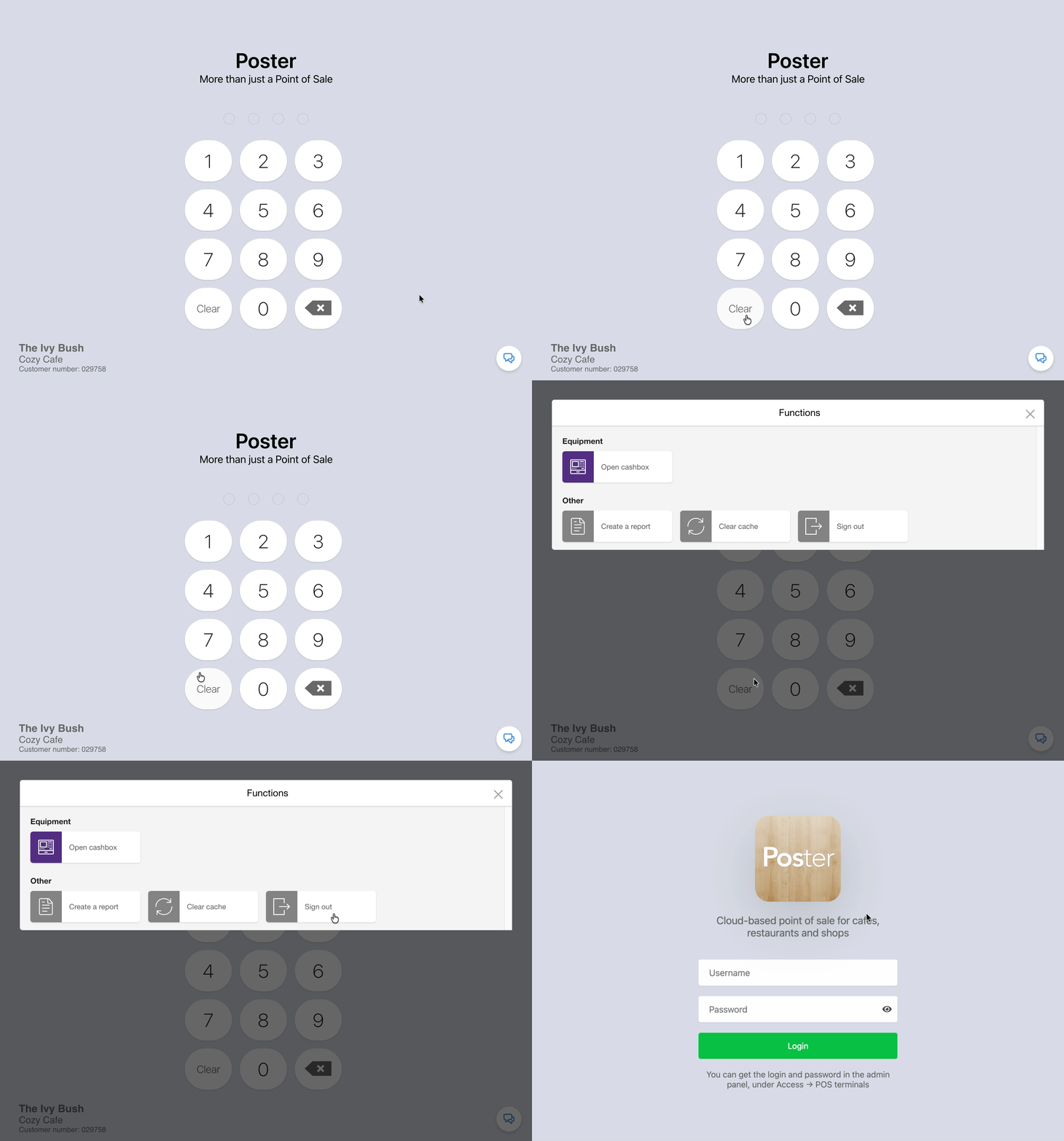
After that, the register login screen will open. To start working again, enter the register login and password.
💡 In the management console go to Access → Tablets and press Log out to sign out all of your employees from the POS at the same time.
☝️ If you forgot password from the POS, restore or change it in the management console in the Access → Tablets tab.