
Use analytics in Postie AI to quickly get answers to business questions based on your account data. You do not need to build reports manually or look for figures in different sections. You submit a query, and Postie analyzes the data, shows key metrics, adds a chart, and suggests what to do next.
💡 Analytics with Postie AI is currently in early access, so you can create an unlimited number of actions for free.
How to generate a report
-
Open Applications → Postie AI in the admin panel.
-
In the Report Builder section, click Start.
-
Enter your query in the Ask a question about your business field and click ⬆️ to start the analysis.
-
Wait for the report to be generated.
-
Click Show more to expand the results and view the recommendations.
💡 To download the report results, in the Results section select the CSV or Excel format.
You can easily make the query more specific for your business — just add a few details. Specify the period, location, menu category, required metric, or comparison format. This will make the answer as accurate as possible for your situation.
To refine the current query, fill in the Specify what to change in the analysis field and click Update report. Postie AI will generate a new version of the report. To return to previous versions, click Version and select the one you need.
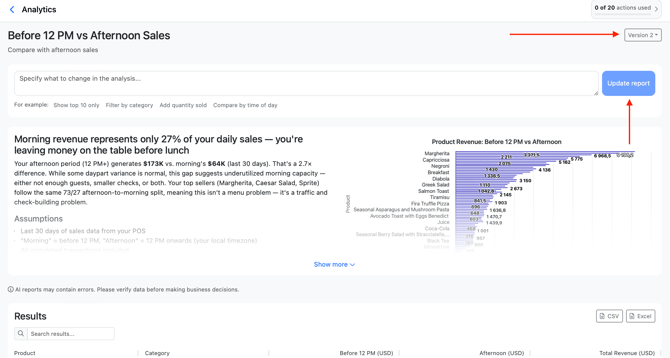
💡 Postie AI saves your query history. To check a report that has already been generated, click it in the Previous reports section. This way, you can quickly return to previous topics and continue the analysis without repeating the setup.
If you do not know where to start, choose any query from the Query examples section and see how Postie analyzes the information.
Let’s look at a few example queries to see how analytics with Postie AI works
Revenue dynamics by day
Enter the query: «Show revenue dynamics by day for the last 30 days» and wait for Postie to generate the report.
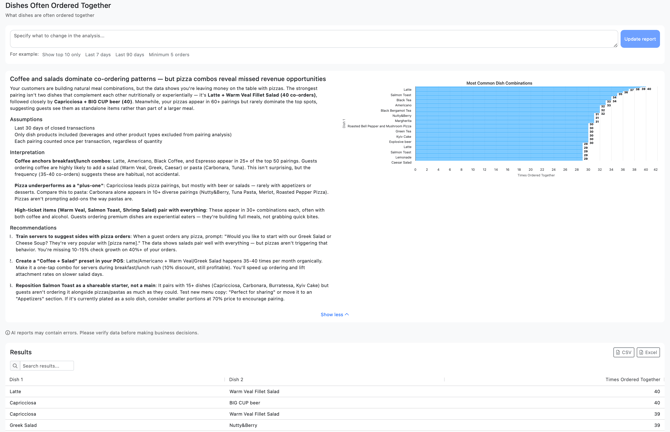
In the first line, Postie gives a general conclusion. In our case, revenue is quite stable, but the report shows that you may be missing a 15–20% weekend opportunity. Postie points out that weekend revenue is not significantly higher than weekday revenue, which may indicate untapped demand.
Next, we see a revenue-by-day chart. It makes it easy to spot peaks, declines, and any sudden changes. In this example, Postie highlights the strongest and weakest days and shows the overall gap between them. This helps you quickly understand whether revenue changes are random or part of a larger pattern.
Below, Postie explains the result in more detail and gives recommendations on what to check. For example, it suggests paying attention to weekend performance, reviewing what happened on unusually strong days, and testing ways to increase average weekend revenue. This helps you see whether it is a one-time fluctuation or a sign of a broader issue.
If you want more details, simply add specifications to the query. For example, ask Postie to show the dynamics by week, compare the results with the previous month, analyze only the top 10 days, or break the data down by a specific location if you have several venues in the account.
What dishes are often ordered together
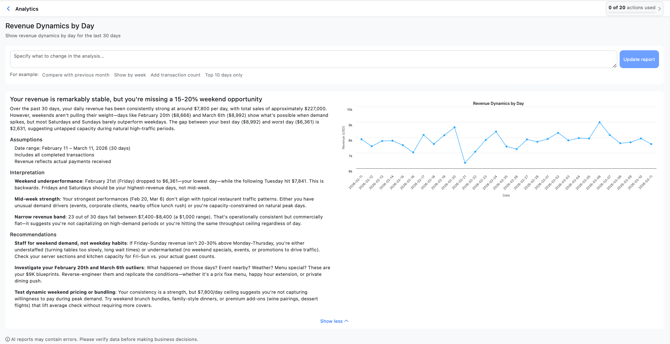
Enter the query: «What dishes are often ordered together».
Postie immediately shows the main conclusion. In our example, coffee and salads dominate co-ordering patterns, while pizza combinations reveal missed revenue opportunities. This means some pairings are repeated regularly, but certain dishes are still not driving larger orders as effectively as they could.
Next, we see a chart of the most common combinations. It shows which pairs appear most often and how they compare with each other. Below, Postie explains the patterns behind the data. For example, dish-and-drink pairings often dominate, while some items work as universal add-ons that pair well with many orders.
Then Postie suggests how to use these insights in sales. For example, you can create combos from popular pairs, add prompts to the menu, or strengthen upselling during the right hours.
To get a more accurate view for your venue, refine the query. For example, look at combinations only for breakfast, only for the bar, or compare dish orders on weekdays and weekends.
Waiter performance
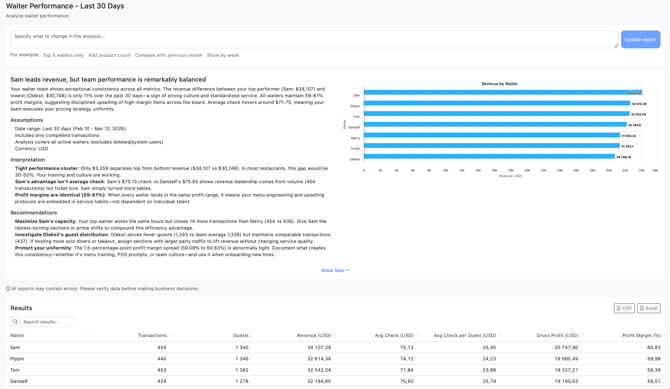
Enter the query: «Analyze waiter performance» and wait for the result.
Postie starts with a short summary. In our example, the team is performing very evenly, while Sam leads in revenue. This means the workload is distributed well, and the overall result is balanced across the team.
Next, we see a chart of revenue by waiter. It clearly shows the top performers and those who may need extra support. Postie also highlights the difference in average check and profit margin — these metrics often explain the gap in results.
Below, Postie gives practical recommendations. For example, it suggests increasing Sam’s capacity during busier shifts, reviewing guest distribution for Oleksii, and documenting the practices that help the team maintain such consistent results.
This report is also easy to tailor to your business. For example, ask Postie to compare the last 7 days, analyze weekends separately, or show who performs better at selling high-margin items.
💡 If you enter the same query several times, Postie may phrase the answer differently and describe the same data in another way. However, the metric values and conclusions will remain the same, because the analysis is based on your account statistics. This is a common feature of AI assistants.
☝️ If an employee does not have access to the Reports and Finances sections, report generation in Postie AI will be unavailable.
To notice cost changes faster, find problematic items, and adjust your menu in time, analyze food cost with Postie AI.